Data Asset이란?
Data Asset은 게임 로직과 데이터를 분리하기 위해 사용하는 데이터 전용 객체입니다.
Data Asset 생성 방법
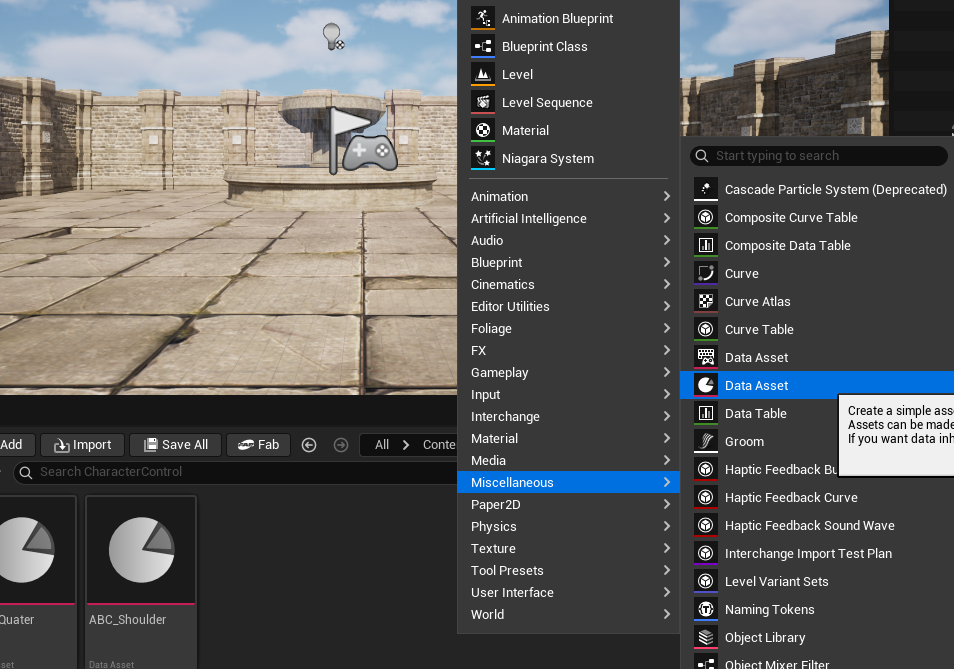
다음과 같이 Data Asset을 생성할 수 있습니다.
Data Asset이 필요한 이유

Character BluePrint의 오른쪽 Details 패널에서는 다양한 속성 값을 직접 설정할 수 있습니다.
하지만 모든 값을 블루프린트에 의존하기보다는, C++ 기반 Data Asset을 통해 필요한 데이터만 분리하여 관리할 수 있습니다.
이를 통해 데이터와 로직을 분리하고 보다 구조적으로 속성 값을 관리할 수 있습니다.
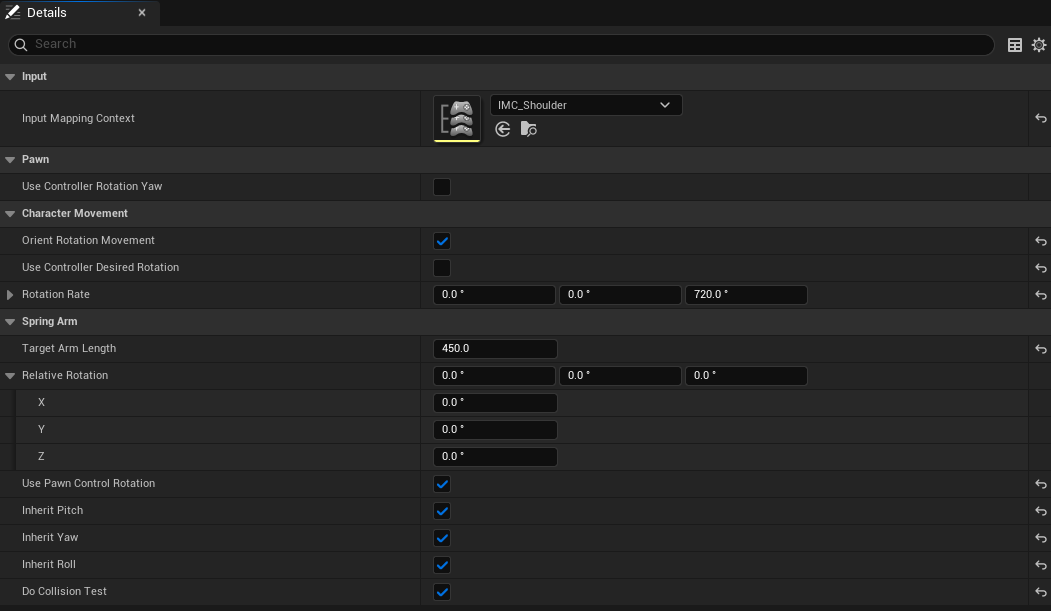
- Use Controller Rotation Yaw : 카메라의 좌우 방향에 맞춰 캐릭터도 함께 회전할 지를 결정
- Orient Rotation Movement : 캐릭터가 입력방향을 바라보도록 자동 회전 시키는 옵션
- Rotation Rate : 회전 속도
- Target Arm Length : 카메라 암과 캐릭터 사이의 거리
- Releative Rotation : 카메라가 플레이어를 향해 몇도 기울어져서 바라볼 것인지를 결정
- Use Pawn Control Rotation : Pawn 안에 있는 특정 컴포넌트 (SpringArm, Camera 등)가 Pawn의 ControlRotation(= Controller의 회전값)을 사용할 지 정하는 옵션.
- Do collision Test : SpringArm이 카메라와 Pawn 사이에 장애물이 있으면 카메라를 앞으로 당겨주는 기능.
// Fill out your copyright notice in the Description page of Project Settings.

#pragma once

#include "CoreMinimal.h"
#include "Engine/DataAsset.h"
#include "ABCharacterControlData.generated.h"

/**
 *
 */
UCLASS()
class RESTUDY_API UABCharacterControlData : public UPrimaryDataAsset
{
	GENERATED_BODY()

public:
	UABCharacterControlData();

	UPROPERTY(EditAnywhere, Category = Pawn)
	bool bUseControllerRotationYaw = false; // Control Rotation의 Yaw값만 체크할지 안할지


	UPROPERTY(EditAnywhere, Category = CharacterMovement)
	bool bOrientRotationMovement = false;

	UPROPERTY(EditAnywhere, Category = CharacterMovement)
	bool bUseControllerDesiredRotation = true;

	UPROPERTY(EditAnywhere, Category = CharacterMovement)
	FRotator RotationRate;

	UPROPERTY(EditAnywhere, BlueprintReadOnly, Category = Input)
	TObjectPtr<class UInputMappingContext> InputMappingContext;

	UPROPERTY(EditAnywhere, Category = SpringArm)
	float TargetArmLength;

	UPROPERTY(EditAnywhere, Category = SpringArm)
	FRotator RelativeRotation;

	UPROPERTY(EditAnywhere, Category = SpringArm)
	bool bUsePawnControlRotation = false;

	UPROPERTY(EditAnywhere, Category = SpringArm)
	bool bInheritPitch = false;

	UPROPERTY(EditAnywhere, Category = SpringArm)
	bool bInheritYaw = false;

	UPROPERTY(EditAnywhere, Category = SpringArm)
	bool bInheritRoll = false;

	UPROPERTY(EditAnywhere, Category = SpringArm)
	bool bDoCollisionTest = false;

};
Quater View란?
- 캐릭터를 대각선 위쪽에서 내려다보는 시점을 의미합니다.

Quter View를 만들기 위해서는 다음과 같은 옵션 설정이 필요합니다.
- Camera는 플레이어를 45º ~ 50º 사이의 각도로 기울여진 각도에서 내려다보도록 배치합니다.
- 플레이어와의 거리를 확보하기 위해 Camera Boom(SpringArm)의 길이를 충분히 길게 설정합니다.
- 카메라의 Look(회전)은 플레이어 입력에 따라 조작되지 않도록 하여, 고정된 시점(Fixed View)을 유지합니다.

Shoulder View란?
- 플레이어의 어깨 뒤쪽에서 캐릭터를 따라가며 바라보는 3인칭 시점 카메라 구조

Shoulder View 를 만들기 위해서는 다음과 같은 옵션 설정이 필요합니다.
- 카메라는 플레이어의 어깨 뒤쪽 위치에 배치하여 캐릭터를 등 뒤에서 바라보는 구도를 만든다.
- 플레이어와의 거리를 확보하기 위해 Camera Boom(SpringArm)의 길이를 충분히 길게 설정합니다.
- 카메라의 Look(회전)은 플레이어의 전방(Forward) 방향을 결정하는 기준이 되며, 입력에 따라 카메라가 회전하고,
그 방향을 기준으로 캐릭터가 움직이도록 구성한다.
생성한 데이터셋을 Input Mapping에 연동하여 카메라 시점 변환 구현
// Fill out your copyright notice in the Description page of Project Settings.


#include "Character/ABCharacterPlayer.h"
#include "Camera/CameraComponent.h"
#include "GameFramework/SpringArmComponent.h"
#include "InputMappingContext.h"
#include "EnhancedInputComponent.h"
#include "EnhancedInputSubsystems.h"
#include "Character/ABCharacterControlData.h"


AABCharacterPlayer::AABCharacterPlayer()
{
	//Camera
	CameraBoom = CreateDefaultSubobject<USpringArmComponent>(TEXT("CameraBoom"));
	CameraBoom->SetupAttachment(RootComponent);
	CameraBoom->TargetArmLength = 400.0f;
	CameraBoom->bUsePawnControlRotation = true;


	FollowCamera = CreateDefaultSubobject<UCameraComponent>(TEXT("FollowCamera"));
	FollowCamera->SetupAttachment(CameraBoom, USpringArmComponent::SocketName);
	FollowCamera->bUsePawnControlRotation = false;

	//Input
	//static ConstructorHelpers::FObjectFinder<UInputMappingContext> InputMappingContextRef(TEXT("/Game/Input/IMC_Default.IMC_Default"));
	//
	//if(InputMappingContextRef.Object)
	//{
	//	DefaultMappingContext = InputMappingContextRef.Object;
	//}

	static ConstructorHelpers::FObjectFinder<UInputAction> InputActionJumpRef(TEXT("/Game/Input/Actions/IA_Jump.IA_Jump"));

	if (InputActionJumpRef.Object)
	{
		JumpAction = InputActionJumpRef.Object;
	}


	static ConstructorHelpers::FObjectFinder<UInputAction> InputChnageActionRef(TEXT("/Game/Input/Actions/IA_ChangeControl.IA_ChangeControl"));
	if(nullptr!= InputChnageActionRef.Object)
	{
		ChangeControlAction = InputChnageActionRef.Object;
	}


	static ConstructorHelpers::FObjectFinder<UInputAction> InputActionShoulderMoveRef(TEXT("/Game/Input/Actions/IA_ShoulderMove.IA_ShoulderMove"));
	if (nullptr != InputActionShoulderMoveRef.Object)
	{
		ShoulderMoveAction = InputActionShoulderMoveRef.Object;
	}


	static ConstructorHelpers::FObjectFinder<UInputAction> InputActionShoulderLookRef(TEXT("/Game/Input/Actions/IA_ShoulderLook.IA_ShoulderLook"));
	if (nullptr != InputActionShoulderLookRef.Object)
	{
		ShoulderLookAction = InputActionShoulderLookRef.Object;
	}


	static ConstructorHelpers::FObjectFinder<UInputAction> InputActionQuaterMoveRef(TEXT("/Game/Input/Actions/IA_QuaterMove.IA_QuaterMove"));
	if (nullptr != InputChnageActionRef.Object)
	{
		QuaterMoveAction = InputActionQuaterMoveRef.Object;
	}

	CurrentCharacterControlType = ECharacterControlType::Quater;


}

void AABCharacterPlayer::BeginPlay()
{
	// 입력 매핑 컨테스트를 할당하는 역할 ( 키보드로 입력받을지,  다른 플랫폼으로 입력받을지등)

	Super::BeginPlay();

	SetCharacterControl(CurrentCharacterControlType);

	//APlayerController * PlayerController = CastChecked<APlayerController>(GetController());


	//if (ULocalPlayer* LocalPlayer = PlayerController->GetLocalPlayer())
	//{
	//	if (UEnhancedInputLocalPlayerSubsystem* SubSystem =
	//		ULocalPlayer::GetSubsystem<UEnhancedInputLocalPlayerSubsystem>(LocalPlayer))
	//	{
	//		SubSystem->AddMappingContext(DefaultMappingContext, 0);
	//	}
	//}


}

void AABCharacterPlayer::SetupPlayerInputComponent(UInputComponent* PlayerInputComponent)
{
	// 언리얼 엔진 입력시스템에서 액션 함수를 매핑시켜주는 곳

	Super::SetupPlayerInputComponent(PlayerInputComponent);

	UEnhancedInputComponent* EnhancedInputComponent = CastChecked<UEnhancedInputComponent>(PlayerInputComponent);

	EnhancedInputComponent->BindAction(JumpAction, ETriggerEvent::Triggered, this, &ACharacter::Jump);
	EnhancedInputComponent->BindAction(JumpAction, ETriggerEvent::Completed, this, &ACharacter::StopJumping);
	EnhancedInputComponent->BindAction(ChangeControlAction, ETriggerEvent::Triggered, this, &AABCharacterPlayer::ChangeCharacterControl);
	EnhancedInputComponent->BindAction(ShoulderMoveAction, ETriggerEvent::Triggered, this, &AABCharacterPlayer::ShoulderMove);
	EnhancedInputComponent->BindAction(ShoulderLookAction, ETriggerEvent::Triggered, this, &AABCharacterPlayer::ShoulderLook);
	EnhancedInputComponent->BindAction(QuaterMoveAction, ETriggerEvent::Triggered, this, &AABCharacterPlayer::QuaterMove);

}

void AABCharacterPlayer::ChangeCharacterControl()
{
	// 누르면
	if(CurrentCharacterControlType == ECharacterControlType::Quater)
	{
		SetCharacterControl(ECharacterControlType::Shoulder);
	}

	else if (CurrentCharacterControlType == ECharacterControlType::Shoulder)
	{
		SetCharacterControl(ECharacterControlType::Quater);
	}

}

void AABCharacterPlayer::SetCharacterControl(ECharacterControlType NewCharacterControlType)
{
	UABCharacterControlData* NewCharacterControl = CharacterControlManager[NewCharacterControlType];
	check(NewCharacterControl);

	SetCharacterControlData(NewCharacterControl);

	APlayerController* PlayerController = CastChecked<APlayerController>(GetController());

	ULocalPlayer* LocalPlayer = PlayerController->GetLocalPlayer();


	if(UEnhancedInputLocalPlayerSubsystem* SubSystem = ULocalPlayer::GetSubsystem<UEnhancedInputLocalPlayerSubsystem>(LocalPlayer))
	{
		SubSystem->ClearAllMappings();
		UInputMappingContext* NewMappingContext = NewCharacterControl->InputMappingContext;
		if(NewMappingContext)
		{
			SubSystem->AddMappingContext(NewMappingContext, 0);
		}
	}

	CurrentCharacterControlType = NewCharacterControlType;

}

void AABCharacterPlayer::SetCharacterControlData(const UABCharacterControlData* CharacterControlData)
{
	Super::SetCharacterControlData(CharacterControlData);

	CameraBoom->TargetArmLength = CharacterControlData->TargetArmLength;
	CameraBoom->SetRelativeRotation(CharacterControlData->RelativeRotation);
	CameraBoom->bUsePawnControlRotation = CharacterControlData->bUsePawnControlRotation;
	CameraBoom->bInheritPitch = CharacterControlData->bInheritPitch;
	CameraBoom->bInheritYaw = CharacterControlData->bInheritYaw;
	CameraBoom->bInheritRoll = CharacterControlData->bInheritRoll;
	CameraBoom->bDoCollisionTest = CharacterControlData->bDoCollisionTest;

}

void AABCharacterPlayer::ShoulderMove(const FInputActionValue& Value)
{
	FVector2D MovementVector = Value.Get<FVector2D>();

	const FRotator Rotation = Controller->GetControlRotation();
	const FRotator YawRotation(0, Rotation.Yaw, 0);


	const FVector FowardDirection = FRotationMatrix(YawRotation).GetUnitAxis(EAxis::X);
	const FVector RightDirection = FRotationMatrix(YawRotation).GetUnitAxis(EAxis::Y);


	AddMovementInput(FowardDirection, MovementVector.X);
	AddMovementInput(RightDirection, MovementVector.Y);
}

void AABCharacterPlayer::ShoulderLook(const FInputActionValue& Value)
{
	FVector2D LookAxisVector = Value.Get<FVector2D>();

	AddControllerYawInput(LookAxisVector.X);
	AddControllerPitchInput(LookAxisVector.Y);

}


void AABCharacterPlayer::QuaterMove(const FInputActionValue& Value)
{
	FVector2D MovementVector = Value.Get<FVector2D>();

	float InputSizeSquared = MovementVector.SquaredLength();
	float MovementVectorSize = 1.0f;
	float MovementVectorSizeSquared = MovementVector.SquaredLength();

	if (MovementVectorSizeSquared > 1.0f)
	{
		MovementVector.Normalize();
		MovementVectorSizeSquared = 1.0f;
	}

	else
	{
		MovementVectorSize = FMath::Sqrt(MovementVectorSizeSquared);
	}


	FVector MoveDirection = FVector(MovementVector.X, MovementVector.Y, 0.0f);
	GetController()->SetControlRotation(FRotationMatrix::MakeFromX(MoveDirection).Rotator());
	AddMovementInput(MoveDirection, MovementVectorSize);


}
해당 작업을 진행 중 몰랐던 부분.

UInputAction의 Input Value Type을 Vector2D로 설정하면, 입력 값은 (X,Y) 형태로 전달된다.
하지만, W,A,S,D와 같은 Digital Input(키보드 입력)은 눌렀을 때 1, 눌리지 않았을 때 0을 반환한다.
따라서 실제 전달되는 값은 다음과 같다.
- W 입력 → (1,0)
- 입력 없음 → (0,0)
그래서 Input Mapping에서 해당 키의 Scalar 값을 (0,1,0)으로 설정하면 입력값에 곱해지는 결과가
(1 * 0 , 0 * 1 , 0 * 0 ) 이므로 최종 Vector2D 값이 (0,0)이 되면서 ShoulderMove()함수가 호출되지 않는 상황이 발생했다.
해당 문제는 Swizzle Modifier를 활용하여 X축으로 들어오는 입력 값을 Y축으로 재매핑하는 방식으로 해결하였다.
즉 (1,0) 입력값이 들어오면 (0,1)로 해주는 것이다.
구현 결과

'Unreal Project > Unreal Study' 카테고리의 다른 글
| Unreal Collision에 관하여 (0) | 2025.10.31 |
|---|---|
| Animation 속도를 구간 별로 다르게 조절하는 방법 (0) | 2025.10.29 |
| Combo Attack 구현해보기 및 구조 정리하기 (0) | 2025.10.27 |
| Unreal Weapon Socket 다루기 (0) | 2025.10.27 |
| Character Movement Component에 대하여 알아보 (0) | 2025.10.22 |